From Bloated to Hardened: A Step-by-Step Docker Optimization Journey | NanoTechBytes | NanoTechBytes
From Bloated to Hardened: A Step-by-Step Docker Optimization Journey
MjShetty
•
8 min read
•February 4, 2026
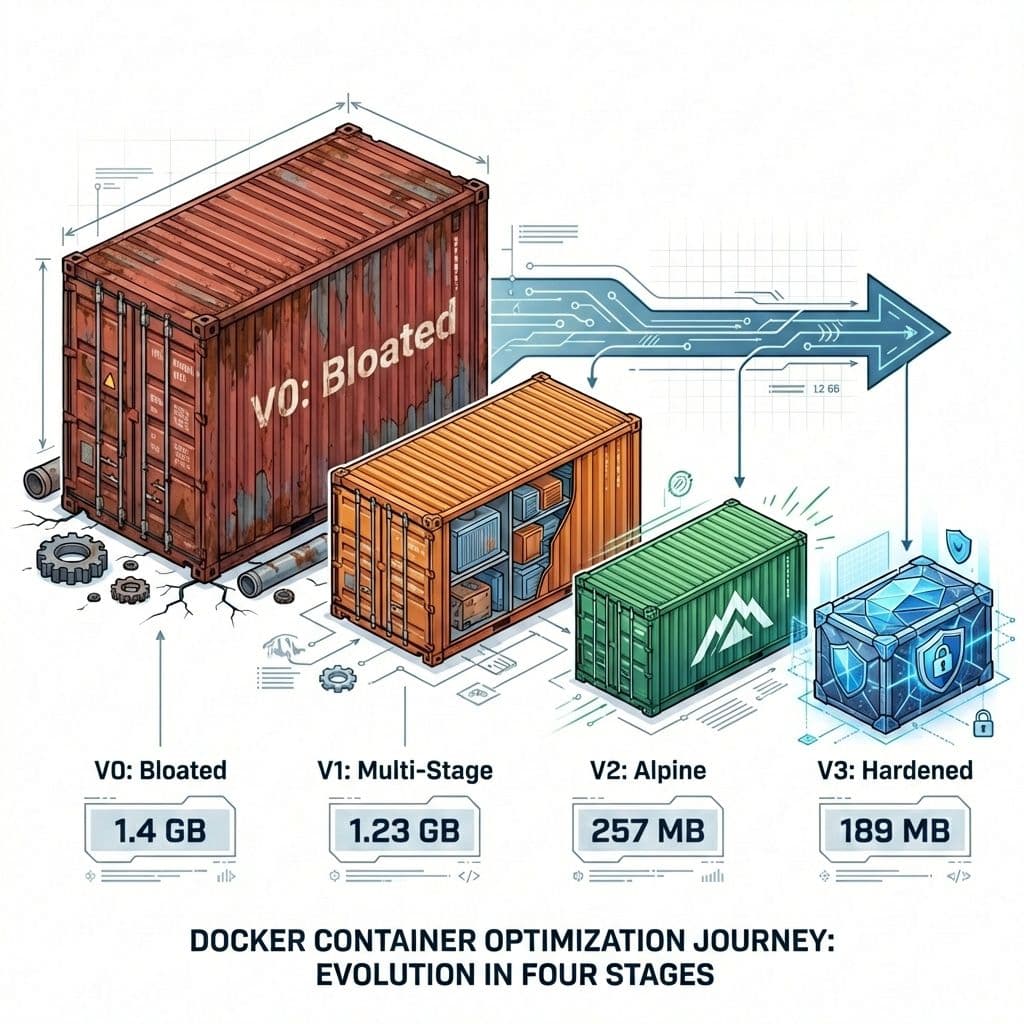
In this guide, we will walk through a real-world case study of optimising a Docker image for a Node.js Todo application. We'll start with a basic (and bloated) implementation and iterate through three levels of optimisation, focusing on size, performance and security.
Before diving into the Dockerfiles, it's important to understand how we run the app. We use Docker Compose to spin up the entire stack locally.
If you found this helpful, please like and share to support the content!
11 views
Share:
Comments (0)
Leave a comment
About MjShetty
Always curious to understand the concept, learning by breaking and fixing, and passionate about sharing knowledge with the community.Get in touch with me→
In the early stages (V0-V2), our compose.yaml is designed for Development:
Two Containers: One for the Backend (API), one for the Client (React Dev Server).
Hot Reloading: We mount source code volumes so changes reflect instantly.
Proxy: A Traefik proxy routes traffic (port 81 -> client/backend).
As we optimise the image for production (V3), this architecture significantly changes to a Single Container model.
Running this with docker compose up in development actually ignores this Dockerfile's production instructions because our compose.yaml overrides the command to run npm run dev. This creates a disparity between "what runs in dev" vs "what runs in prod."
The Result (V0)
Size: 1.4 GB ⚠️
Issues:
Bloat: Contains source code, tests, and build tools not needed at runtime.
Security: Attack surface is huge due to the full OS and dev tools.
Before applying the fix, let's understand the concept. Multi-Stage Builds allow you to use multiple FROM instructions in a single Dockerfile. Each instruction starts a new stage of the build, allowing you to selectively copy artifacts from one stage to another, leaving behind everything you don't need in the final image.
Criteria for Splitting Stages
How do you decide when to create a new stage?
Build Tools vs. Runtime: If your app needs compilers (GCC, Go, Rust) or transpilers (TypeScript, Babel) to build but not to run, split them.
Asset Generation: If you generate static files (React build, SASS compilation), do that in a dedicated stage.
Security: If you need secrets/keys for the build but not for runtime, use a build stage so the secret doesn't persist in the final layer history.
Best Practices
Name Your Stages: Use AS build or AS dev for clarity.
Minimise Layers: Merge commands in early stages; copying only final artifacts matters most for the last stage.
Use Specific Bases: Use a heavy image for building (node:22) and a light one for running (node:22-alpine or distroless).
Stage 3 (Final): Copies only the built assets and backend code from previous stages.
Orchestration Note
Our compose.yaml was updated to target specific stages (target: backend-dev and target: client-dev). This allows us to keep using the same Dockerfile for both our optimised production builds AND our hot-reloading development environment.
The Result (V1)
Size: 1.23 GB
Comparison: ~12% reduction.
Verdict: Better, but still bloated because the base image (node:22) is based on Debian and weighs ~1GB on its own.
To tackle the base image size, we moved to Alpine Linux, a lightweight security-oriented distribution.
The Changes
Base Image: node:22-alpine (instead of node:22).
Virtual Build Tools:
Context Optimisation: Added .dockerignore to exclude .git and local node_modules.
Source Code
dockerfile
RUN apk add --no-cache --virtual .build-deps python3 make g++ py3-setuptools && \
    npm ci --only=production && \
    npm cache clean --force && \
    apk del .build-deps
Rationale
Alpine: Uses musl instead of glibc and busybox, usually under 20MB compressed.
Ephemeral Build Tools: We installed python/make/g++ only for the npm install step (to compile native modules like sqlite3) and removed them in the same layer
Cache Cleaning: Removed the ~/.npm cache which can hold hundreds of MBs.
.dockerignore: Prevents local files (like node_modules, .git, .env) from being sent to the Docker daemon.
Speed: Reduced "build context" size means faster upload times to the daemon.
Safety: Prevents overwriting container-compatible modules with local OS-specific binaries.
Security: Stops accidental leakage of local secrets or git history into the image layers.
For the highest level of security, we adopted Google's Distroless images and enforced a Non-Root User.
The Changes
Distroless Runtime: Switched final stage to gcr.io/distroless/nodejs22-debian12.
Challenge: Distroless is Debian-based (glibc). Alpine is musl. We had to switch our Build Stage back to node:22-bookworm-slim to ensure compiled binaries were compatible with the runtime.
2. Non-Root User:
Orchestration Change (Crucial)
At this stage, we cannot simply run docker compose up with the old config because the V3 image is a single, bundled artifact. It doesn't have a shell, so it can't run the npm run dev commands our dev compose file expects.
We created a new compose.prod.yaml for this:
Target: final stage.
Service: Single app service (combines frontend+backend).
Action: Runs the hardened, immutable image exactly as it would run in a Kubernetes production cluster.
v3-dockerfile
dockerfile
#################################################### Stage: base#################################################### Use Debian Slim for build to match Distroless (glibc)FROM node:22-bookworm-slim AS baseWORKDIR /usr/local/app################## CLIENT STAGES ###################################################################### Stage: client-base###################################################FROM base AS client-baseCOPY client/package.json client/package-lock.json ./RUN npm install && npm cache clean --forceCOPY client/.eslintrc.cjs client/index.html client/vite.config.js ./COPY client/public ./publicCOPY client/src ./src#################################################### Stage: client-dev###################################################FROM client-base AS client-devCMD ["npm", "run", "dev"]#################################################### Stage: client-build###################################################FROM client-base AS client-buildRUN npm run build################################################################### BACKEND STAGES ######################################################################################################################## Stage: backend-base###################################################FROM base AS backend-dev# Install build tools for native modules (sqlite3/mysql) on DebianRUN apt-get update && apt-get install -y --no-install-recommends python3 make g++ && rm -rf /var/lib/apt/lists/*COPY backend/package.json backend/package-lock.json ./RUN npm install && npm cache clean --forceCOPY backend/spec ./specCOPY backend/src ./srcCMD ["npm", "run", "dev"]#################################################### Stage: test###################################################FROM backend-dev AS testRUN npm run test#################################################### Stage: build-prod#################################################### Intermediate stage to install prod dependenciesFROM base AS build-prodWORKDIR /usr/local/appCOPY--from=test /usr/local/app/package.json /usr/local/app/package-lock.json ./# Install build tools again for prod depsRUN apt-get update && apt-get install -y --no-install-recommends python3 make g++ && rm -rf /var/lib/apt/lists/*RUN npm ci --only=production && npm cache clean --force#################################################### Stage: final#################################################### Distroless RuntimeFROM gcr.io/distroless/nodejs22-debian12 AS finalENV NODE_ENV=productionWORKDIR /usr/local/app# Copy prod dependenciesCOPY--from=build-prod /usr/local/app/node_modules ./node_modules# Copy app sourceCOPY backend/src ./src# Copy built frontendCOPY--from=client-build /usr/local/app/dist ./src/static# Run as non-root user (distroless provides 'nonroot' user with uid 65532)USER nonrootEXPOSE 3000CMD ["src/index.js"]
The Final Result (V3)
Size: 189 MB 🛡️
Security: Maximum (No shell, Non-root).
Comparison: ~26% smaller than V2, 86% smaller than V0.
Cannot exec into the Container as the base image is distroless
While V3 (Distroless) is the paramount of open-source security, enterprise and government environments often require an even stricter standard: Hardened Images.
Optimising for this level ("V4") means moving beyond just "minimal" to "compliant" and "zero-CVE".
Options to Consider
Chainguard Images:
Philosophy: "Zero CVEs". They rebuild every image daily to patch all known vulnerabilities immediately.
Base: Wolfi OS (APK-based but glibc compatible).
Pros: Extremely secure, SBOMs included by default.
Cons: Free tier uses latest tags only; production stability requires a subscription.
Iron Bank (DoD):
Source: Platform One (US Department of Defence).
Compliance: Built to meet strict federal NIST/STIG standards.
Use Case: Mandatory for US Government/Defence software.
CIS Hardened Images or Docker Hardened Images:
Source: Center for Internet Security.
Compliance: Pre-configured to meet CIS Benchmarks (file permissions, kernel parameters).
Implement a Devsecops practice to identify vulnerabilities regularly and come up with a automation or process to patch them
When to choose V4?
If you are operating in a highly regulated industry (Finance, Healthcare, Defence), V3 might not be enough. You may need the Zero-CVE guarantee and Contractual SLA that comes with these commercial hardened image providers.
By iterating through these steps, we reduced the image size by 86%, significantly improved the security posture, and established a clear separation between our Development and Production orchestration workflows.