But the Cloud Native Buildpacks (CNB) project itself is just the engine. To actually build an application, you need fuel. You need the specific scripts and base operating systems that know how to compile a Java, Go, or Node.js app.This is where Paketo Buildpacks comes in.
In this post, we will draw the line between what CNB provides and what Paketo provides. We will explore what you need to create a custom builder, and we will walk step-by-step through exactly what happens under the hood when Paketo builds a Node.js project.
To master the buildpack ecosystem, you must understand the separation of concerns between the standard and the implementation.
What Cloud Native Buildpacks (CNB) Provides: Think of CNB as the orchestrator and the rulebook. Maintained by the CNCF, the CNB project provides:
The Specifications: The Buildpack API and Platform API that dictate how components must interact.
The Lifecycle: The core binary (analyzer, detector, restorer, builder, exporter) that executes the 5 phases of the build.
The Platform Tools: Tools like the CLI or the Tekton integration that users use to trigger the builds.
If you found this helpful, please like and share to support the content!
0 views
Share:
Comments (0)
Leave a comment
About MjShetty
Always curious to understand the concept, learning by breaking and fixing, and passionate about sharing knowledge with the community.Get in touch with me→
pack
What Paketo Provides: Paketo is an open-source, vendor-neutral project that writes the actual content that executes inside the CNB engine. Paketo provides:
Component Buildpacks: The language-specific tools (like the Node Engine or Maven buildpacks) that contain the bin/detect and bin/build scripts.
Base OS Images (Stacks): The underlying Ubuntu-based build-time and runtime operating systems.
Curated Builders: Ready-to-use OCI images (like paketobuildpacks/builder-jammy-base) that bundle the base OS, the CNB lifecycle, and the Paketo buildpacks together.
In our previous optimization guide https://nanotechbytes.com/post/docker-optimization-multi-stage-distroless-guide, we took a bloated 1.4GB Node.js image and manually optimized it down to a 189MB Distroless image using multi-stage Dockerfiles. That manual optimization is powerful. But what if you could achieve enterprise-grade security, caching, and size optimization without writing a single line of configuration? Welcome to V5.
In this guide, we are deleting the Dockerfile entirely. We will use the `pack` CLI and Paketo Buildpacks to inspect our source code and automatically generate a secure, production-ready OCI image. Using project https://github.com/mjgit007/docker-packeto-demo.git to test packeto builds.
🪄 The Magic of Zero Configuration Navigate to your Node.js project directory. You will notice there is no `Dockerfile`. To turn this raw source code into a container, we just need to provide a "Builder". A builder is an image that contains the necessary operating system and detection scripts to compile your code. We trigger the build using a single command:
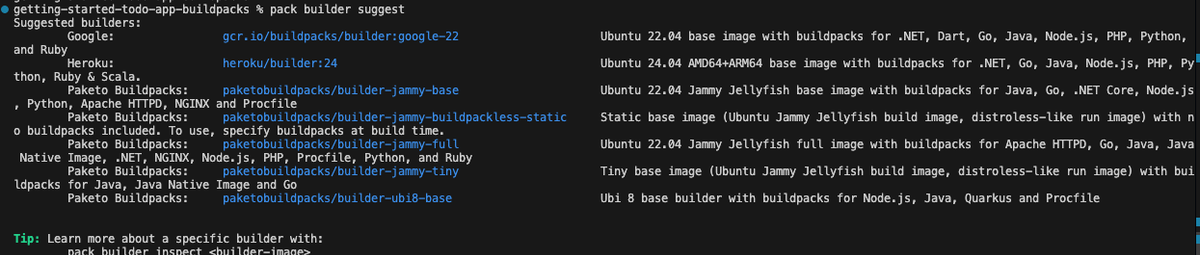
Use the below command to check what are the builders supported for your project
pack_builder_suggest
bash
pack builder suggest
I am choosing 'paketobuildpacks/builder-jammy-base' as it supports nodejs projects. Trigger the build using a single command:
When you press enter, the Paketo builder takes over. It mounts your source code, figures out that it is a Node.js application, and begins the Cloud Native Buildpack lifecycle.
If you watch the terminal output during the build, you will see the system moving through specific, highly predictable phases. Here is exactly what happens under the hood.
1. Analyzing The engine checks your local daemon and remote registries for previous versions of this image to reuse cached layers.
Plaintext
Source Code
bash
===> ANALYZING
Previous image with name "getting-started-todo-app:v5" not found
2. Detecting The builder tests your source code against dozens of language scripts. Five specific buildpacks detect the package.json and opt-in to the build.
3. Restoring & Building The engine reads any available cache, then executes the build logic. It downloads the correct Node.js runtime, installs your npm dependencies, and sets up your environment variables.
Source Code
bash
===> RESTORING
===> BUILDING
Paketo Buildpack for Node Engine 1.3.1
Paketo Buildpack for NPM Install 1.3.1
4. Exporting Finally, it stacks these isolated layers on top of a secure Ubuntu Jammy base image and saves it to your Docker daemon.
Because there is no actual Dockerfile, you might wonder how you verify what went into your image. Buildpacks compile the image using a series of specific, traceable layers.
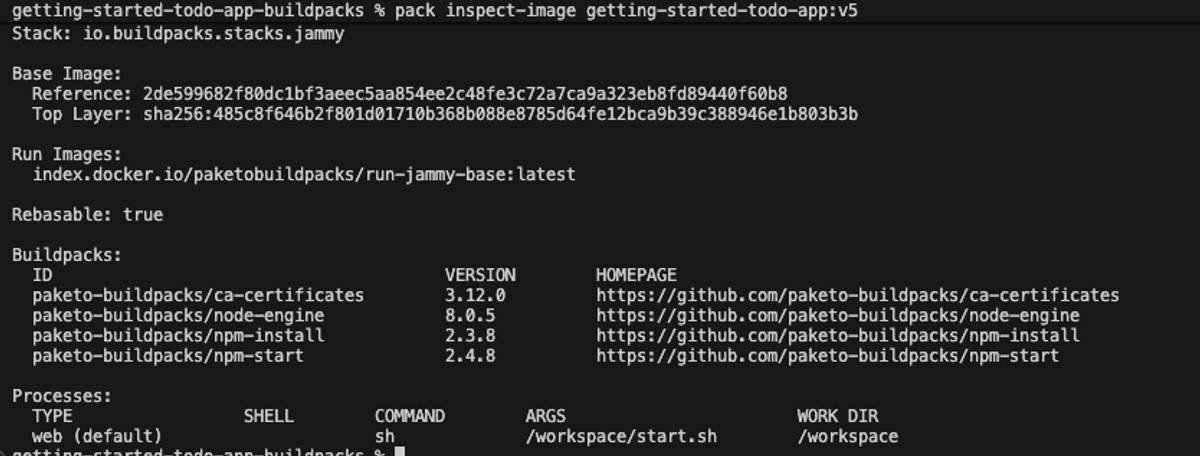
To inspect exactly what the Buildpack put into your image, you use the pack inspect-image command. This replaces the need to read a static configuration file.
Try running this in your terminal:
Source Code
bash
pack inspect-image getting-started-todo-app:v5
This output gives you a detailed breakdown of RunImage, Build packs and Processes .
#🔥 Pro-Tip: The "Tiny" Builder for Ultimate Security
You are currently using the builder-jammy-base image. This base includes /bin/bash because interpreted languages like Node.js often require standard C libraries and OS utilities to function easily.
If you are building an application with a compiled language like Go, Java, or Rust, Paketo allows you to use the builder-jammy-tiny image instead.
The tiny builder is the exact equivalent of Google's Distroless base. It does not even contain a /bin/sh or /bin/bash executable. If an attacker managed to breach your application and you tried to docker exec into a tiny container, Docker would throw an error stating the shell does not exist. This renders standard terminal-based attacks completely impossible.
By using the pack CLI, you ensure your images are built with the latest security patches, optimised caching, and full transparency. No Dockerfile required.