You switched to Distroless for the security wins and smaller footprint. But now your pod is crashing, and kubectl exec throws an error because there is no shell. Here is the production-grade way to get inside.
Distroless images (gcr.io/distroless/*) strip out everything that is not your application runtime: no /bin/sh, no apt, no apk. That is the point. A smaller attack surface means fewer CVEs.
The trade-off hits you the moment something breaks in production:
OCI runtime exec failed: exec failed: container_linux.go:345:
starting container process caused: exec: "sh": executable file not found in $PATHYou cannot kubectl exec into the container because there is nothing to exec into. Here are three methods to solve this, ordered by how often you will use them.
If you found this helpful, please like and share to support the content!
Always curious to understand the concept, learning by breaking and fixing, and passionate about sharing knowledge with the community.Get in touch with me→
This is the standard, no-redeployment method. It injects an ephemeral debug container into your running pod using Kubernetes Ephemeral Containers (requires Kubernetes 1.23+).
kubectl debug -it <pod-name> \
--image=busybox \
--target=<container-name> \
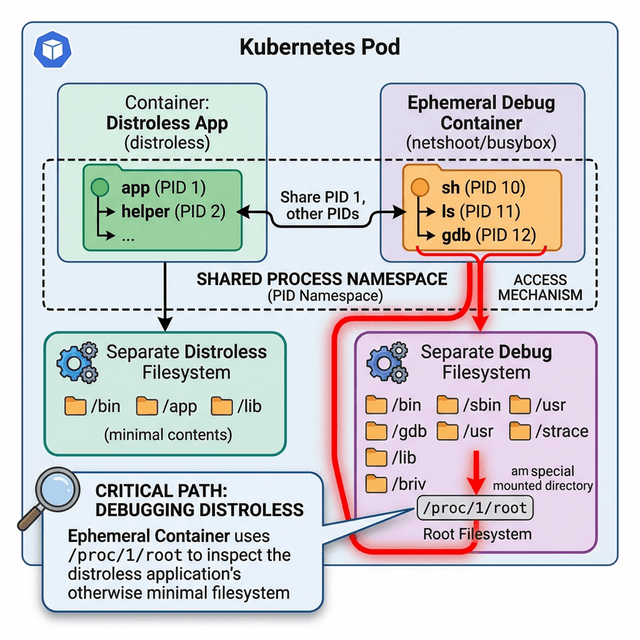
-n <namespace>Why `--target` matters. Without it, your debug container runs in an isolated process namespace. You will only see its own processes. With --target=<container-name>, Kubernetes shares the target container's process namespace. Running ps aux inside the debug container now shows your app's processes.
Accessing the file system. Your app's files are not at /app inside the debug container. They live at:
ls /proc/1/root/appThe /proc/1/root path exposes the target container's entire filesystem through the kernel's process filesystem interface.
Google publishes debug variants for every distroless image. These include a busybox shell and are meant for development or staging troubleshooting.
Change your image tag from:
image: gcr.io/distroless/java17-debian11:nonrootTo:
image: gcr.io/distroless/java17-debian11:debug-nonrootWith the debug tag, the container includes a shell and you can exec normally:
kubectl exec -it <pod-name> -- shThe drawback: You must change the image and restart the pod. This requires a redeployment and is not suitable for live incident response. Never ship :debug tags to production.
If the process namespace handling and /proc/1/root path feel error-prone under pressure, cdebug automates it.
# Install
brew install iximiuz/tap/cdebug
# Debug a distroless container
cdebug exec -it --image=busybox <pod-name>cdebug automatically shares the process namespace and mounts the target filesystem to a predictable path, removing the manual steps from Method 1.
| Scenario | Method | Command |
|---|---|---|
| Live production incident | kubectl debug | kubectl debug -it <pod> --image=busybox --target=<container> |
| Staging / development | :debug image tag | Change tag, redeploy, kubectl exec -- sh |
| Repeated debugging workflow | cdebug | cdebug exec -it --image=busybox <pod> |
Three things to remember:
1. Use kubectl debug for live production issues - no redeployment required. 2. Use :debug tags for development and staging environments only.
3. Your app's files are at /proc/1/root, not at the path you expect inside the debug container.